




Dawlance AC Remote Control Guide: All Buttons & Functions Explained
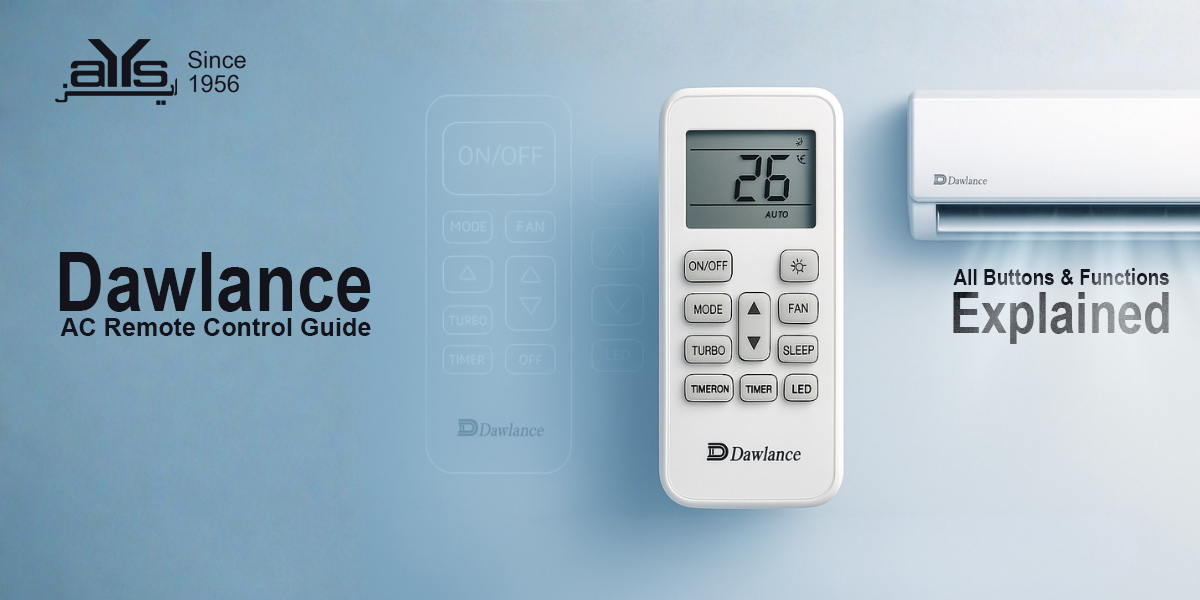
Did you know your Dawlance Inverter AC has hidden features like “Self Clean” and “Child Lock” that you might not be using? Understanding your remote control is the key to maximizing cooling while minimizing electricity bills.
Below is a complete guide to the buttons and symbols found on standard Dawlance Inverter AC remotes (like the Chrome, Powercon, and Sprinter series).
Common Remote Buttons & Meanings
| Button Name | Function |
|---|---|
| MODE | Cycles between operation modes: Cool (Snowflake), Heat (Sun), Dry (Water Drop), and Fan. |
| ECO / GEAR | Activates energy-saving mode. It limits compressor speed to reduce electricity consumption (ideal for night use). |
| TURBO | Runs the AC at maximum speed for 15-30 minutes to cool the room instantly. |
| SLEEP | Automatically increases the temperature by 1°C per hour during the night to prevent over-cooling and save energy. |
| CLEAN / SELF CLEAN | Starts the automatic cleaning cycle. The AC freezes and defrosts the coil to wash away dust. Note: The AC will turn off and run a 20-30 min cycle. |
| DISPLAY / LED | Turns the lights on the indoor unit ON or OFF (useful if the light bothers you at night). |
| SWING | Adjusts the vertical (up/down) or horizontal (left/right) air flow direction. |
Hidden Features & Tricks
- Child Lock: On most Dawlance remotes, pressing the (+) and (-) buttons simultaneously for 3 seconds will lock the remote. A lock icon will appear. Repeat to unlock.
- Fahrenheit to Celsius: If your remote is showing °F, press and hold the Mode and Temp Down (-) buttons together to switch back to °C.
Watch: Detailed Dawlance Remote Walkthrough
For a visual demonstration of these hidden settings, watch this helpful guide:
 Dawlance AC
 EcoStar AC
 General AC
 Gree AC
 Haier AC
 Homage AC
 Kenwood AC
 Midea AC
 Orient AC
 Panasonic AC
 Samsung AC